
Next step
Request SAGA.
30 minutes are enough for a first assessment: which meetings you keep minutes for, who writes them today and what should remain of them.
AI minute-taker
Listen. Take notes. Forget what should be forgotten. SAGA takes down your meetings, drafts the minutes with the source in the margin and deletes what should not remain. Everything stays in house.
Example meeting, all people invented. Conversation and minutes texts were prepared for the recordings, the interface is real. The screenshots show the German interface.

A meeting in four acts: the transcript shows what is said, with names and timestamps. One click on Decision captures the wording and the votes. From that the minutes are drafted, and their timestamp leads back to the spot in the transcript. At the end only the minutes remain; audio, transcript and questions are deleted.
Re-enacted with invented example meetings. The real interface is shown in the images further down.
Committees and meetings decide what applies: money, positions, projects. What applies ends up in the minutes. And they are usually written by one single person, while everyone else is talking.
The person keeping the minutes listens, counts hands and writes down every decision word for word. Afterwards they sit down with it again, with their notes and their memory. And three days later someone asks for the exact wording.
Personnel matters, budgets, negotiations: meetings deal with confidential things. A recording that travels to someone else’s cloud is out of the question for many committees. For a works council, all the more so.
We thought: this has to be easier. Without a single word leaving the building.
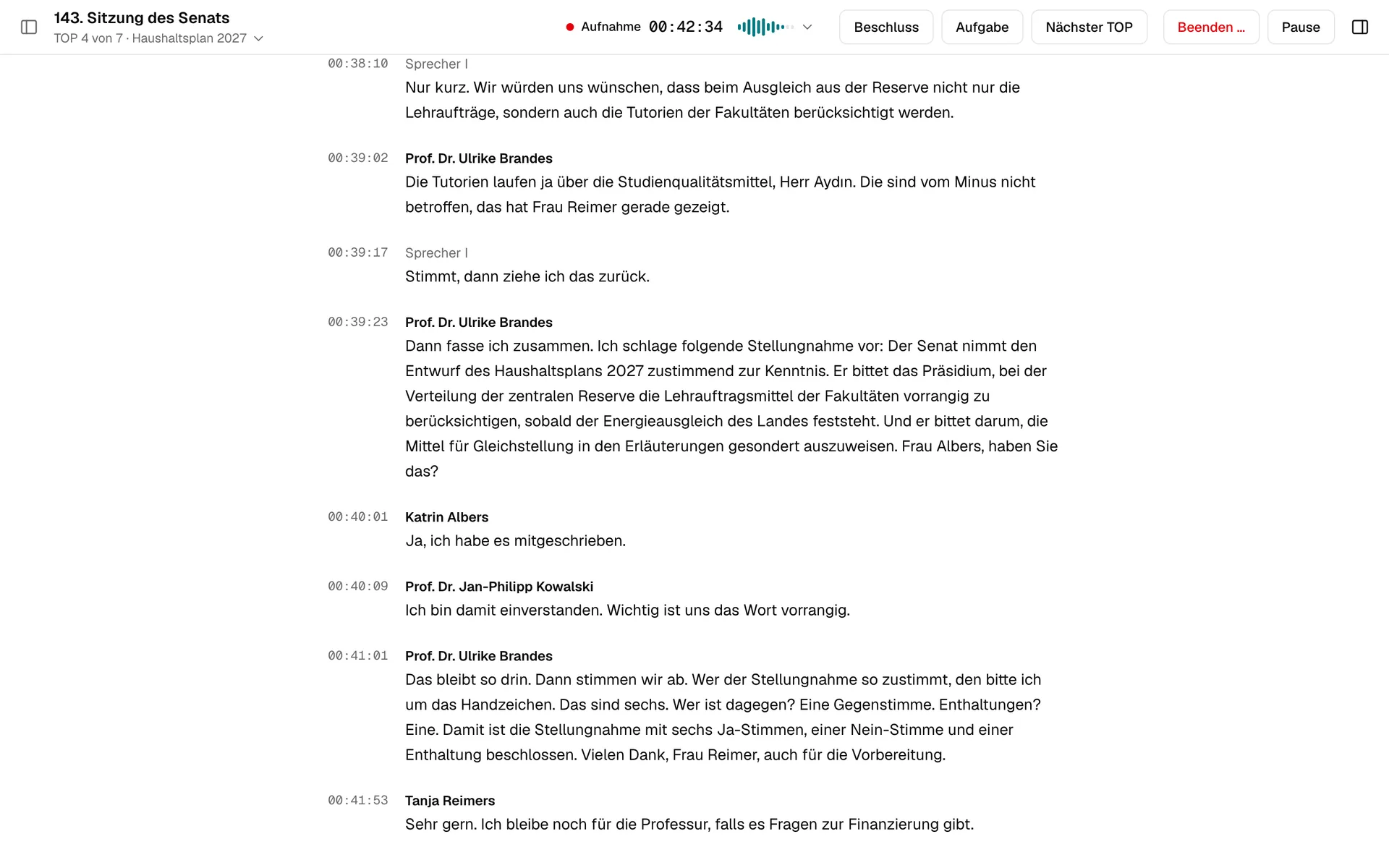
This is SAGA during a meeting: at the top the title, agenda item and recording, next to them the buttons for decision, task and next item. Below it, what is being said.
Example meeting, all people invented. Conversation and minutes texts were prepared for the recordings, the interface is real. The screenshots show the German interface.
Animation: word by word, a sound wave turns into the transcript of a works council meeting, with names and timestamps. One click captures the decision with its wording and votes. Then audio and transcript are deleted, and the minutes with the decision remain.
The handover between shifts grows to twenty-five minutes. We can live with that.
Then let us vote. Seven in favour, nobody against, two abstentions. That is decided.
The works council approves the three-shift model for hall 3 from 1 November.
Yes 7 · No 0 · Abstain 2Said. Decided. Minuted.
While recording there is only one job: listening. Everything that controls the meeting sits in one line at the top. Below it, the transcript builds up, section by section.
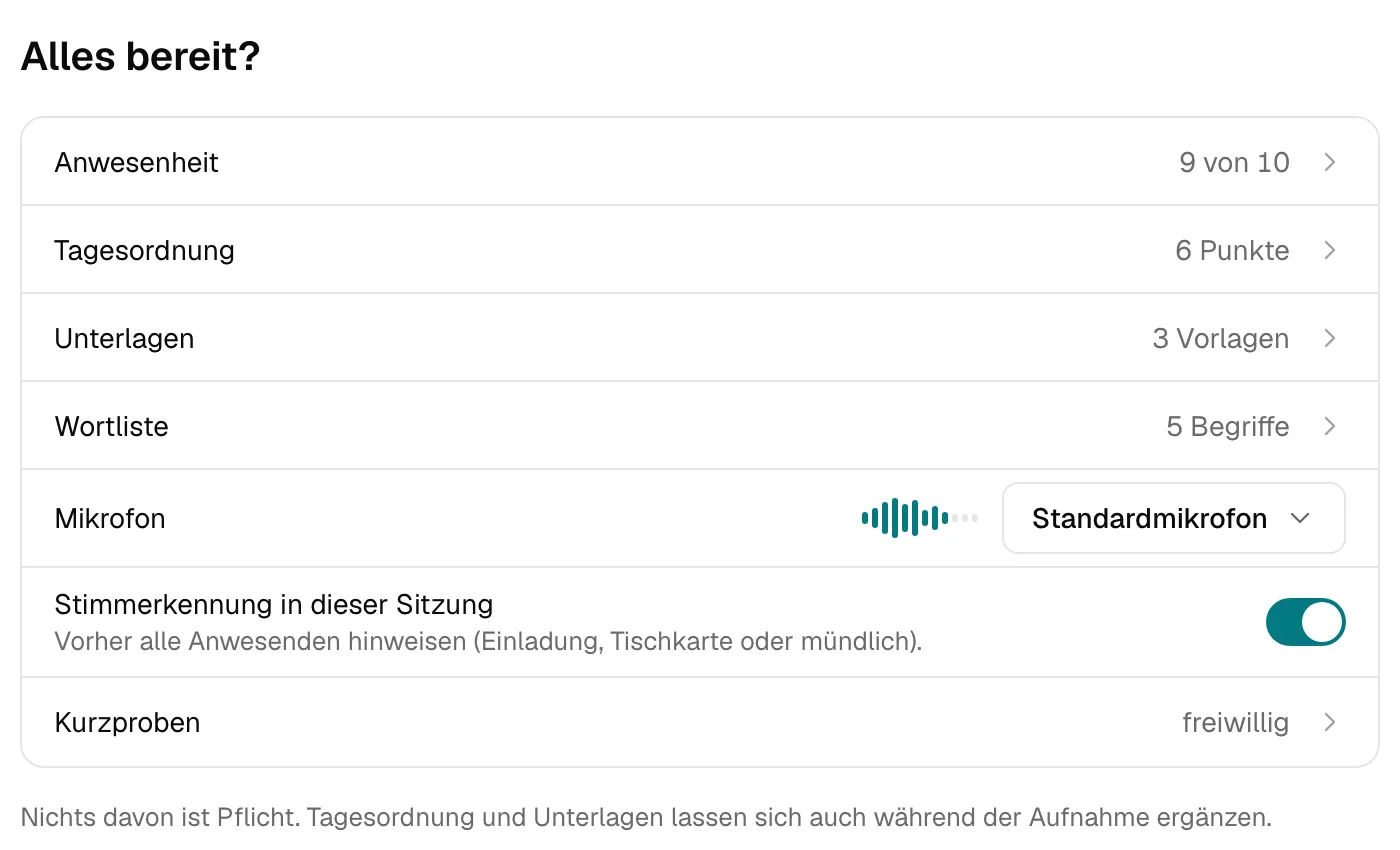
Which committee is meeting? Who is here? All set? You can prepare the agenda, documents and a word list, but none of it is required. And the level meter is the microphone test: if it moves, the microphone is listening.
One paragraph per change of speaker, the name above it, the timestamp in the margin. The meeting reads like a text, not like subtitles.
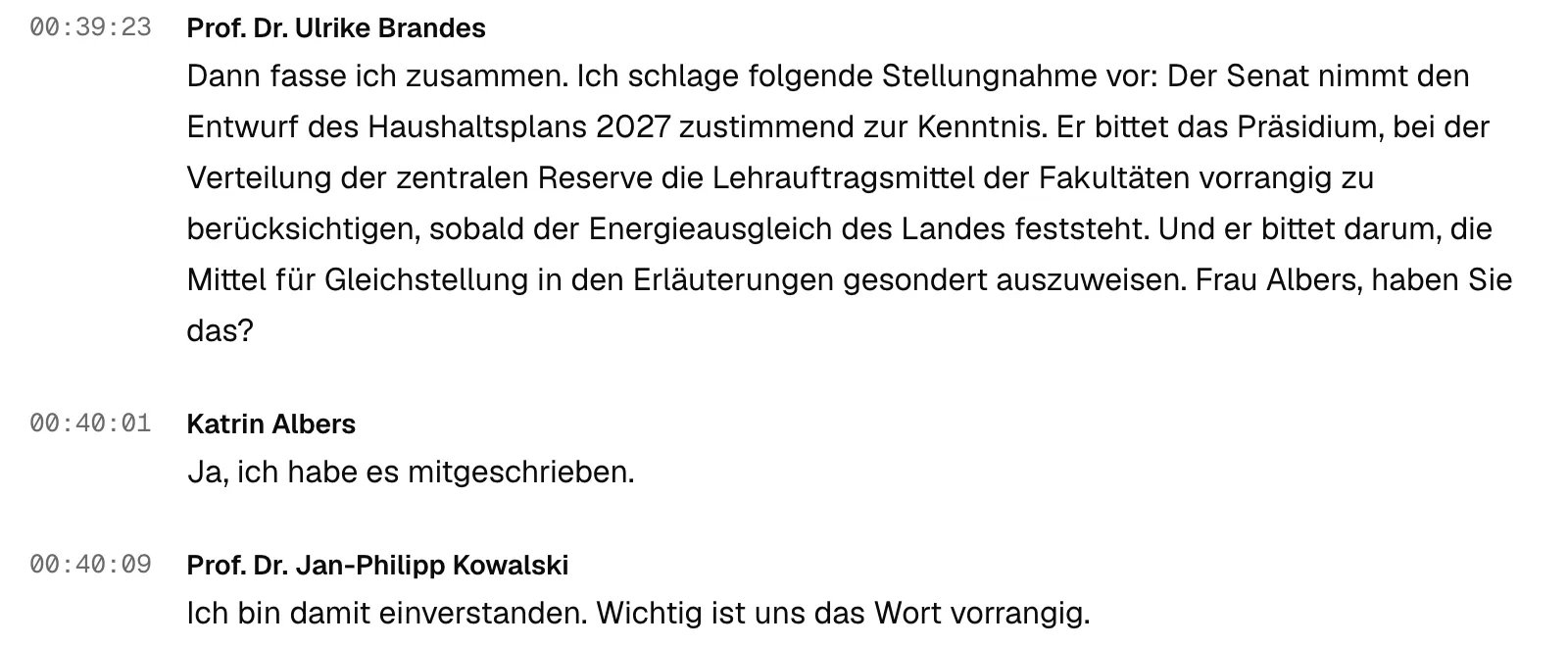
The decision sits in the transcript, exactly where it was made. When there is a moment, you add the wording and the votes. The draft minutes take it as a given.

“What does the budget mean for teaching contracts?” SAGA answers from what was said and from the meeting documents. Below the answer are timestamps: one click and you are at that spot in the transcript.
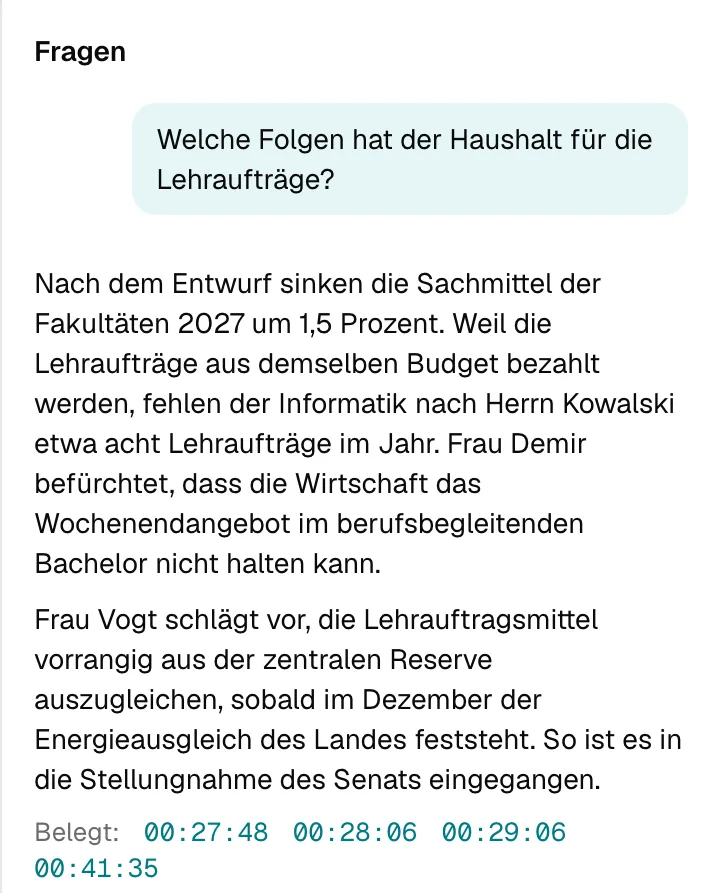
Decisions are fixed exactly where they are made. And you are back in the conversation.
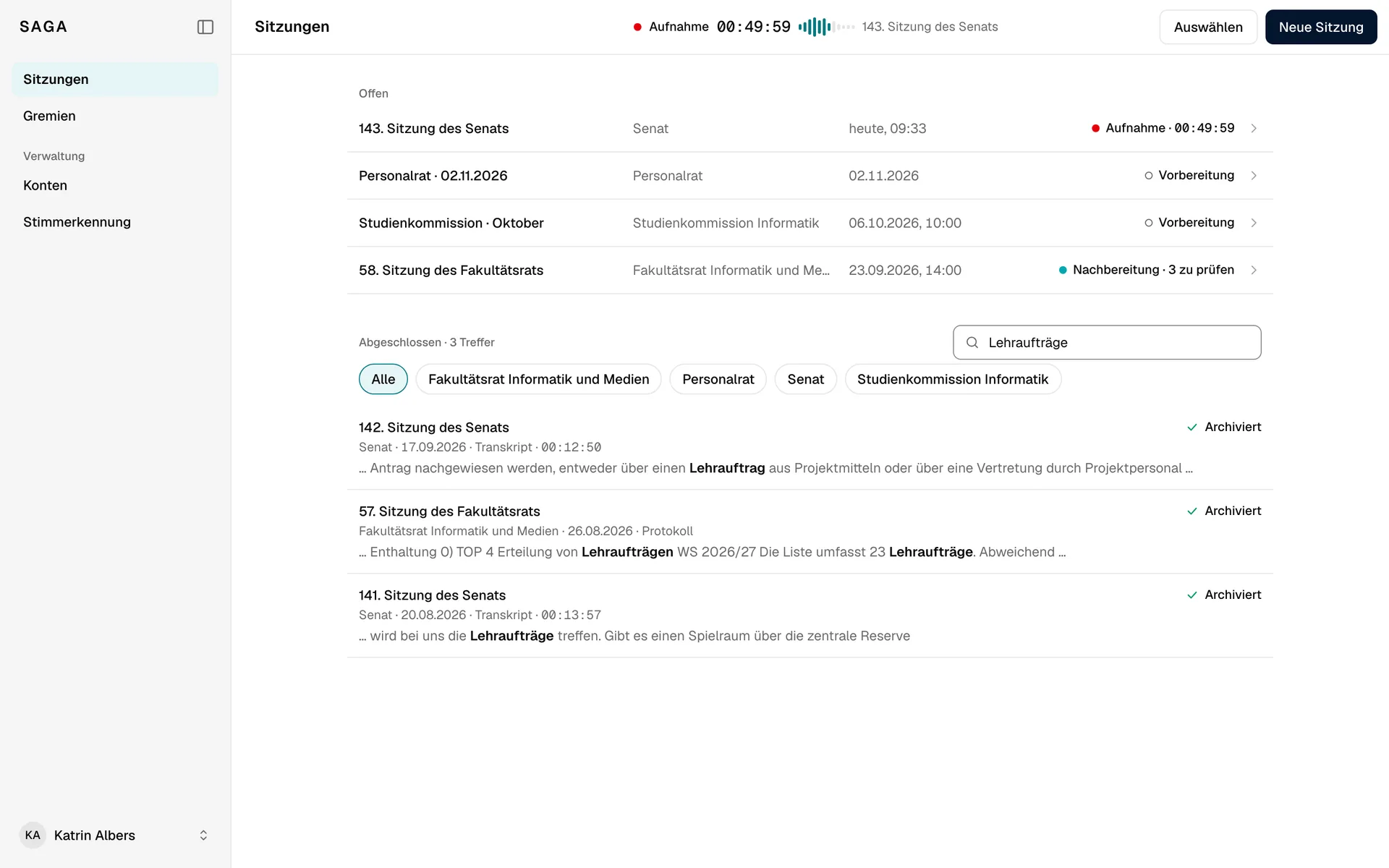
Mid-meeting, someone asks what was said about it in August. You go to the meeting list and search, while the recording keeps running at the top: running time, level, title. The search covers minutes and transcripts. One click on the recording and you are back in the meeting.
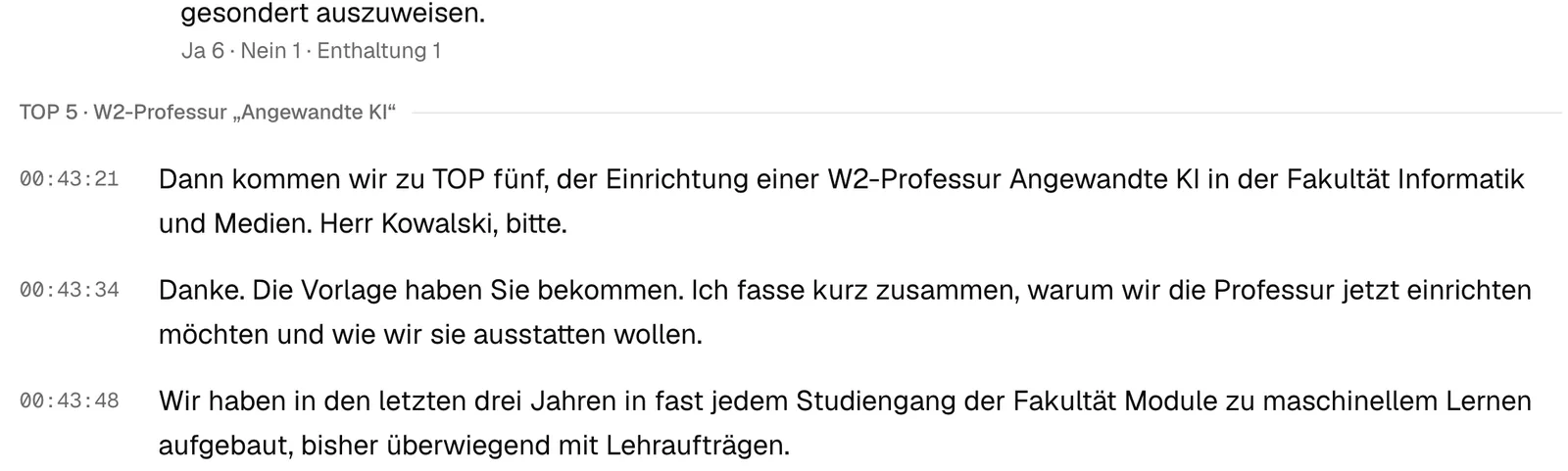
After the meeting you review what is still open in one pass. Then the minutes come together item by item: header, attendees, agenda, decisions with votes, tasks. Not a block of text but a document.
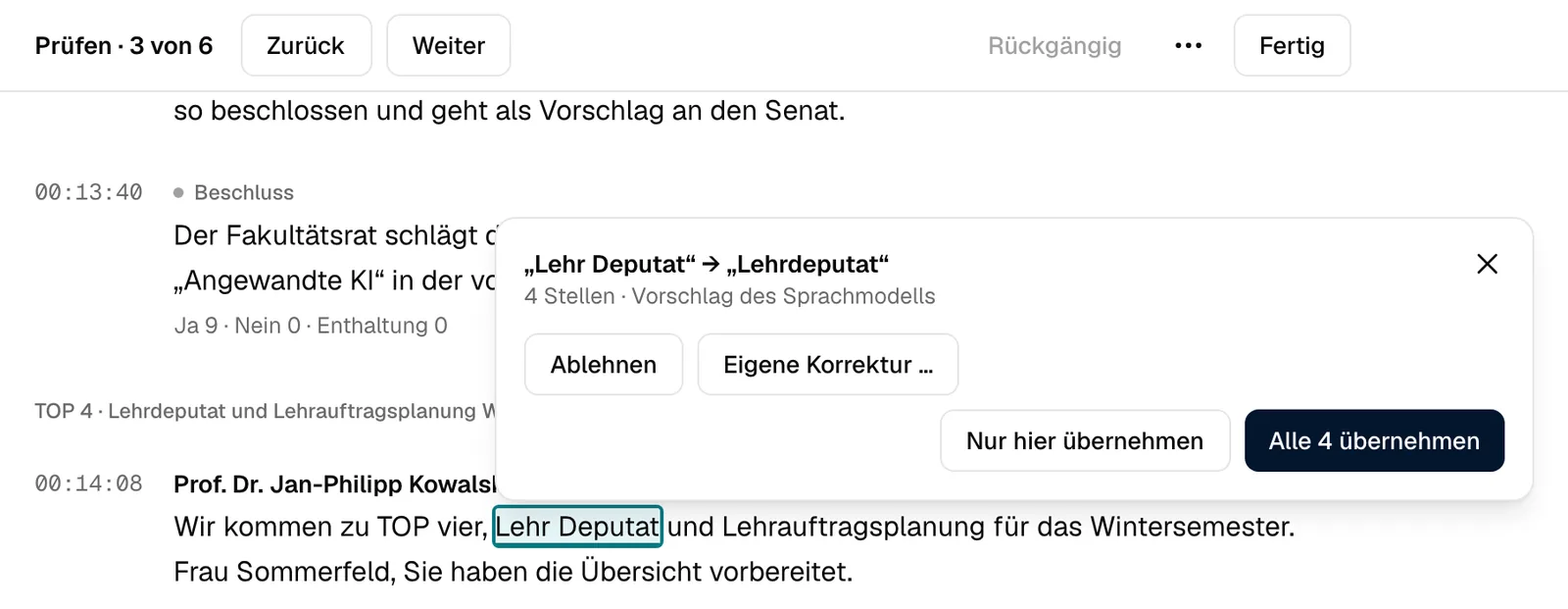
SAGA walks through the open points in order: attendance, speakers, word suggestions. The suggestion is already open at the word.
A word split in two becomes one again: one click on “accept all 4” and every spot is corrected. If the suggestion does not fit, you reject it or write your own correction.
SAGA suggests, you decide. The transcript only changes where you accept a change.
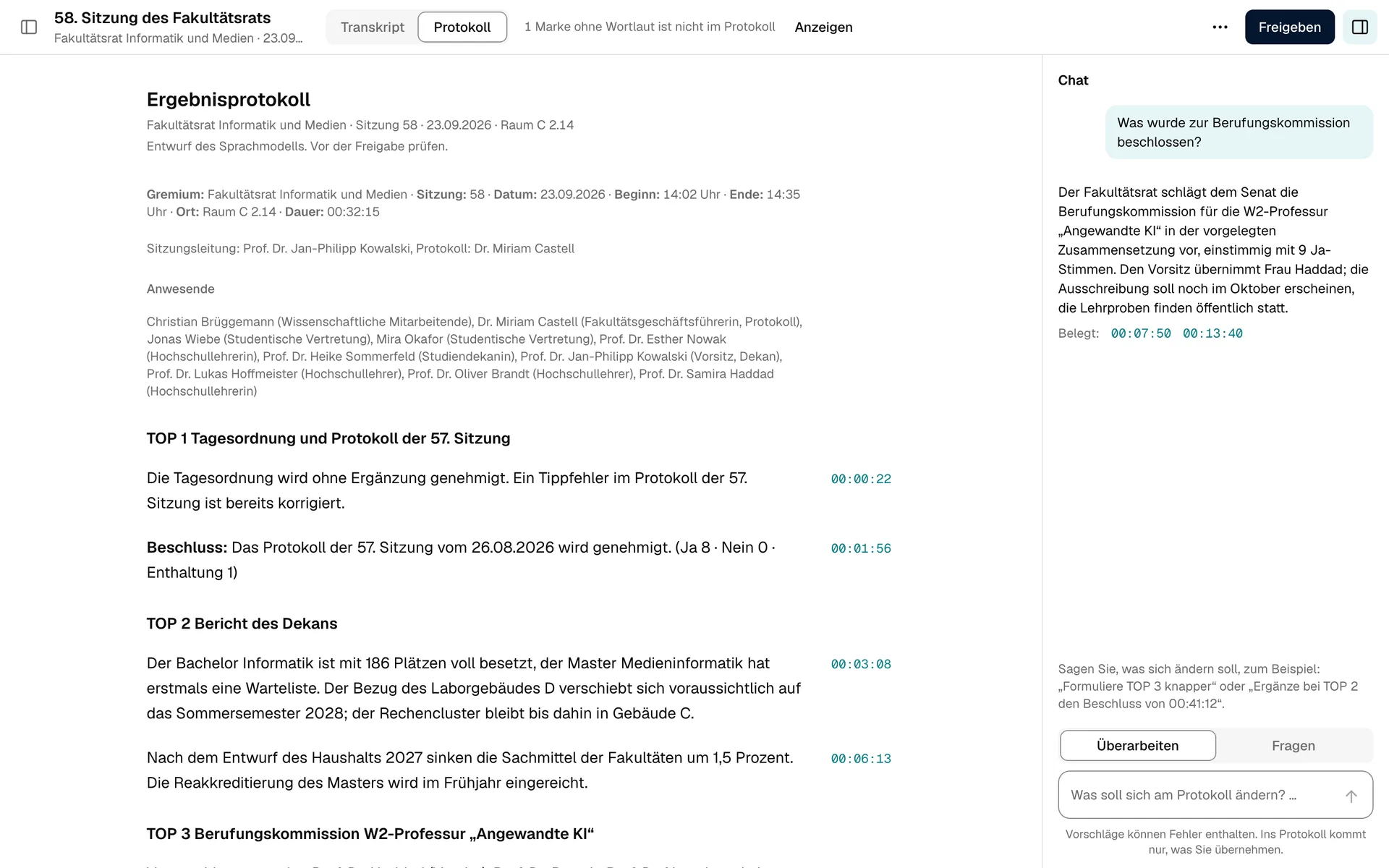
What comes out is a document. SAGA fills in the date, start time and place itself, from the meeting data. You edit any paragraph right where you read it.
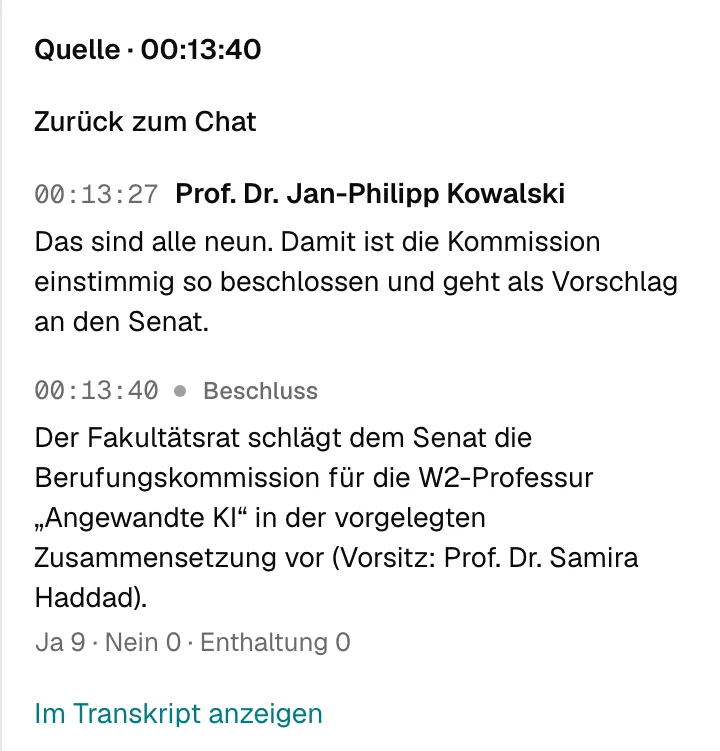
The margin shows where a paragraph comes from. One click shows the spot in the transcript: who said it, and for a decision the votes. SAGA checks every one of these timestamps against the transcript. Whatever is not there gets dropped.
A paragraph without a valid timestamp stands without a source. Better no source than an invented one.
“Make item 3 shorter.” The chat next to the minutes proposes the change. Only what you accept goes into the minutes.
SAGA brings in the committee’s earlier minutes by itself; documents such as the rules of procedure you file once with the committee. Chat and draft refer to them, with a link.
Once approved, the minutes can no longer be changed. Export as PDF, Word or Markdown, with a header and template per committee.
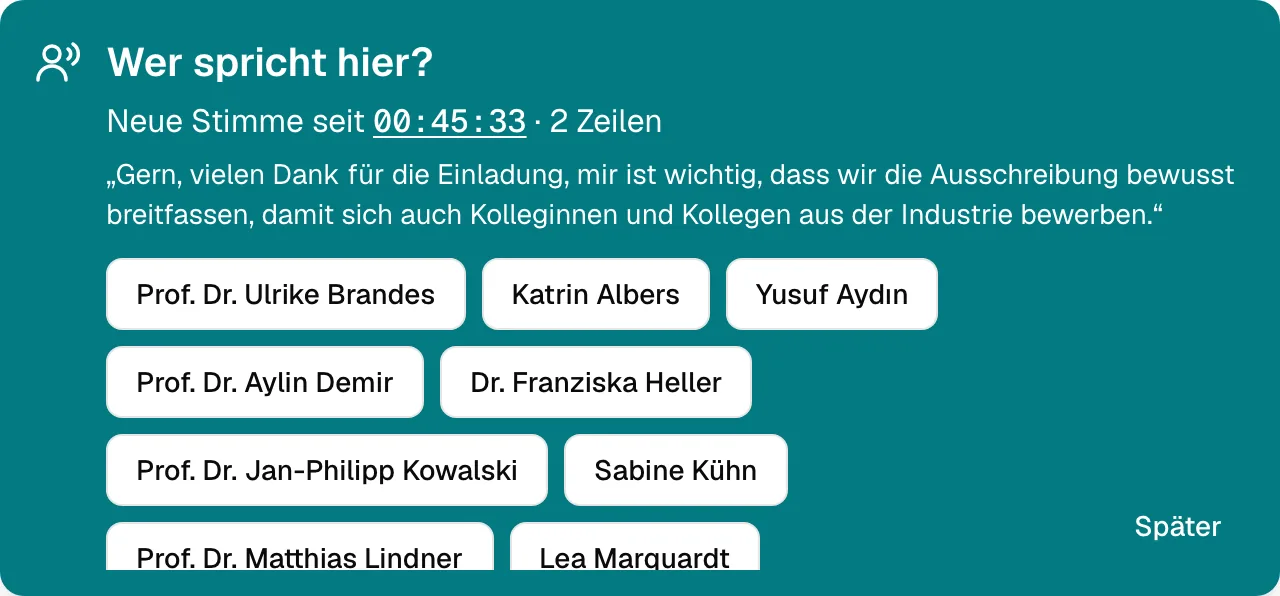
SAGA hears when a new voice speaks. It still does not guess a name: only someone a person has named or confirmed goes into the minutes as a speaker.
One click on the unknown speaker shows the sentence and everyone present. Assign once, and every paragraph from that voice carries the name. Guests get their own.
When a voice without a name speaks, SAGA asks once by itself. Or later, if there is no time right now.
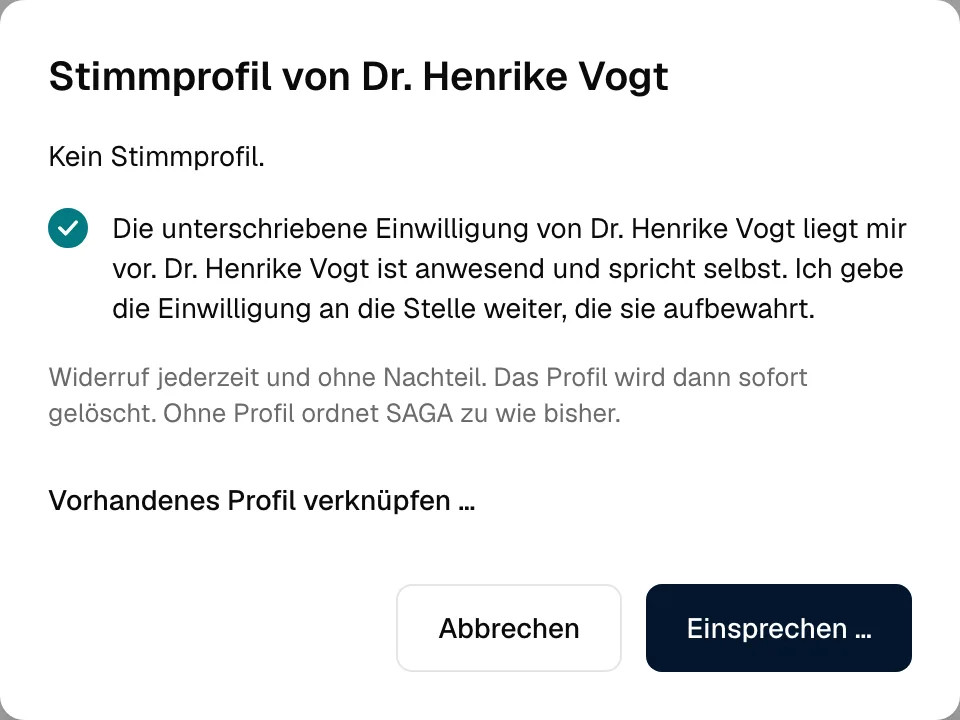
Some committees want SAGA to recognise their members by voice. That is what voice profiles are for, and strict rules apply to them.
With anything that listens, the first question is: where does the audio actually go? And who reads along? With SAGA the answer is short.
Recording happens in the browser of the device in the room. Recognition, answers and minutes are produced on a computer that stands in your building. No web search, no external AI service.
SAGA, too, records what happens in operation: numbers, counters, states. But never what was said. Never a question to the meeting. Never a sentence from the minutes.
Applies to SAGA itself. Making sure the service that writes answers and minutes does not log requests either is part of setting up operations.
At the end you decide what remains of a meeting. SAGA deletes the audio in every case, even when archiving.
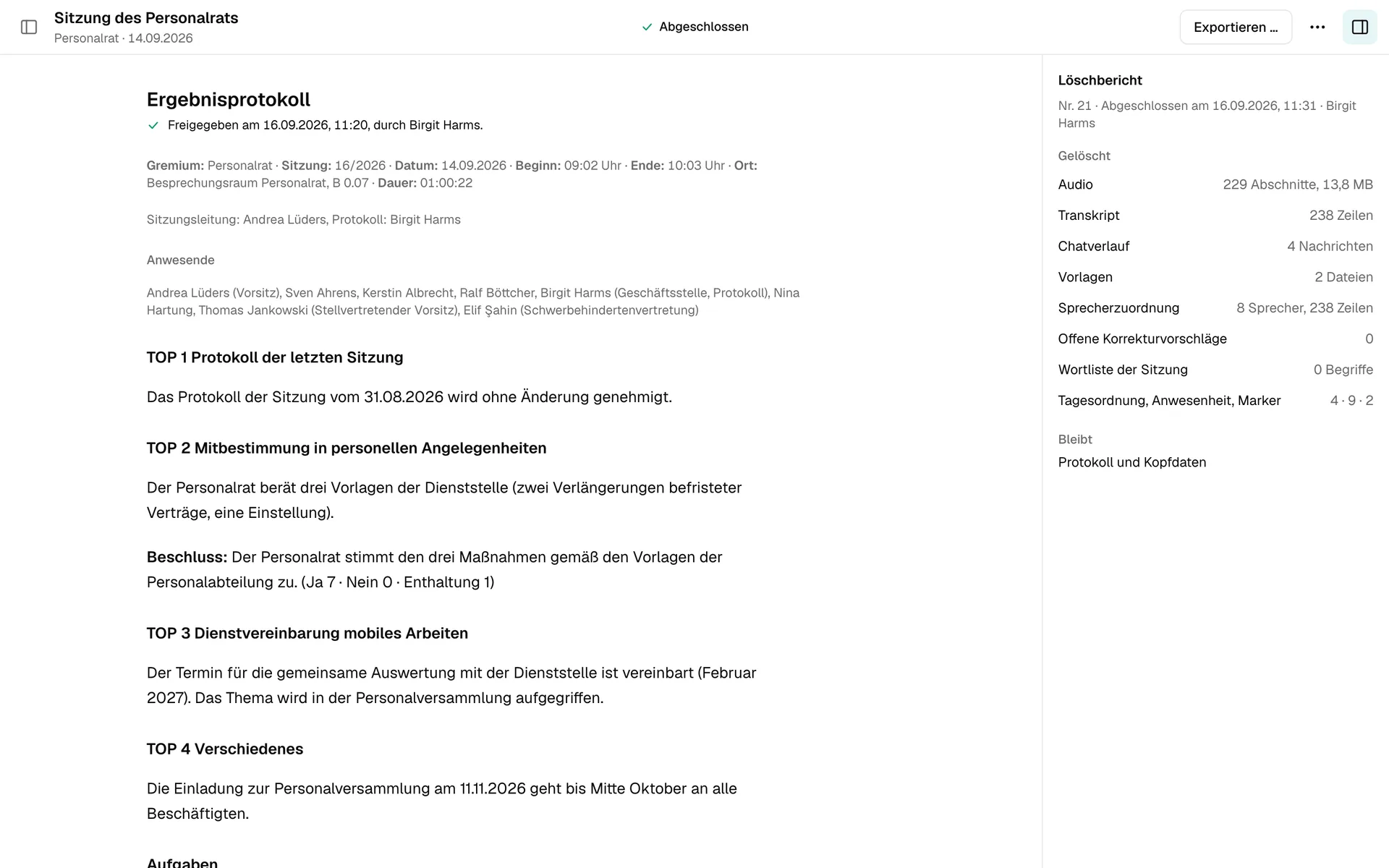
This is a meeting after closing: the approved minutes and, on the right, the deletion report. It counts what was deleted, when and by whom. It contains no content itself.
Deleted means deleted. With a report.
No recycle bin. No recovery.
Deleted means: files and database rows removed. Remnants on the storage medium remain until they are overwritten. SAGA cannot reach exports.
SAGA builds on LOKI’s local speech recognition and on LOKI’s connection to local language models. And what SAGA records does not disappear into a drawer: you save the approved minutes as Word or PDF where LOKI reads. Months later LOKI finds the decision, with the exact source.
No cloud · no telemetry · no emails
¹ Only with written consent, switched off by default.
LOKI for your knowledge. MINERVA for your machines. HEIMDALL for the safe path to the cloud. SAGA for your meetings. Each product runs on its own, can be started individually and extended with the others at any time. Together they become your company’s memory: LOKI, MINERVA and HEIMDALL share one machine, one login, one role model, one audit log and one works agreement. Every application inherits what is already in place. SAGA brings LOKI’s technology into the meeting room.
SAGA builds on LOKI’s local speech recognition and model connection. And once the approved minutes sit where LOKI reads, LOKI finds the decision again, with its source.
Listen. Take notes. Forget what should be forgotten.
30 minutes are enough for a first assessment: which meetings you keep minutes for, who writes them today and what should remain of them.
SAGA runs on your hardware, without the cloud. Voice profiles are switched off by default and can only be used with written consent. Answers and drafts can contain mistakes: what goes into the minutes is what you accept and approve. All images show invented example meetings in the German interface.
Still have questions?
Read the FAQ